One platform. Two operating systems.
The work behind the performance, connected.
Plan productions, coordinate people and materials, and manage engagements in workspaces built for your role.
Who it is for
Production Desk
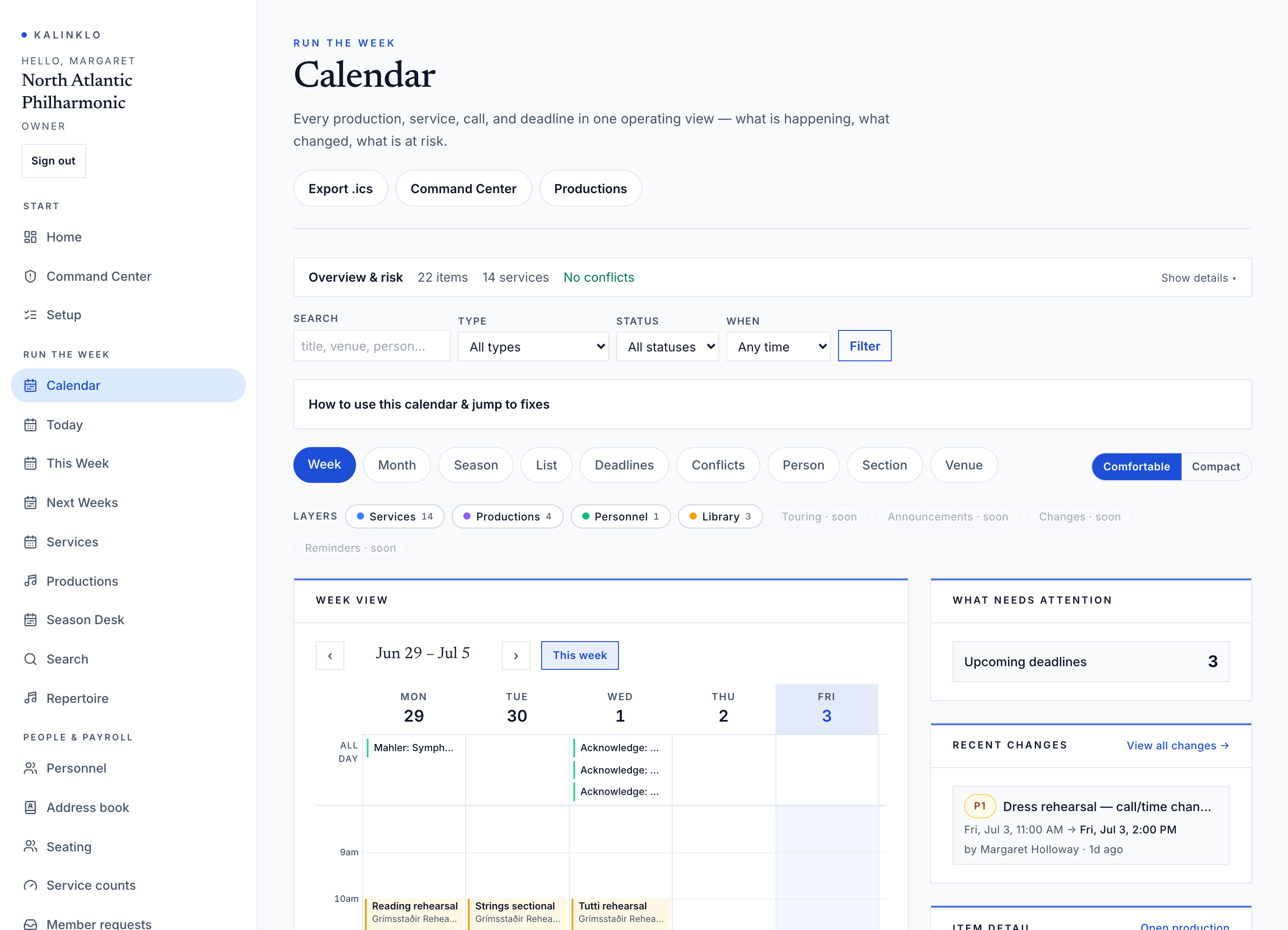
Productions, services, call times, personnel, materials, announcements, confirmations, and readiness.
Explore this workspace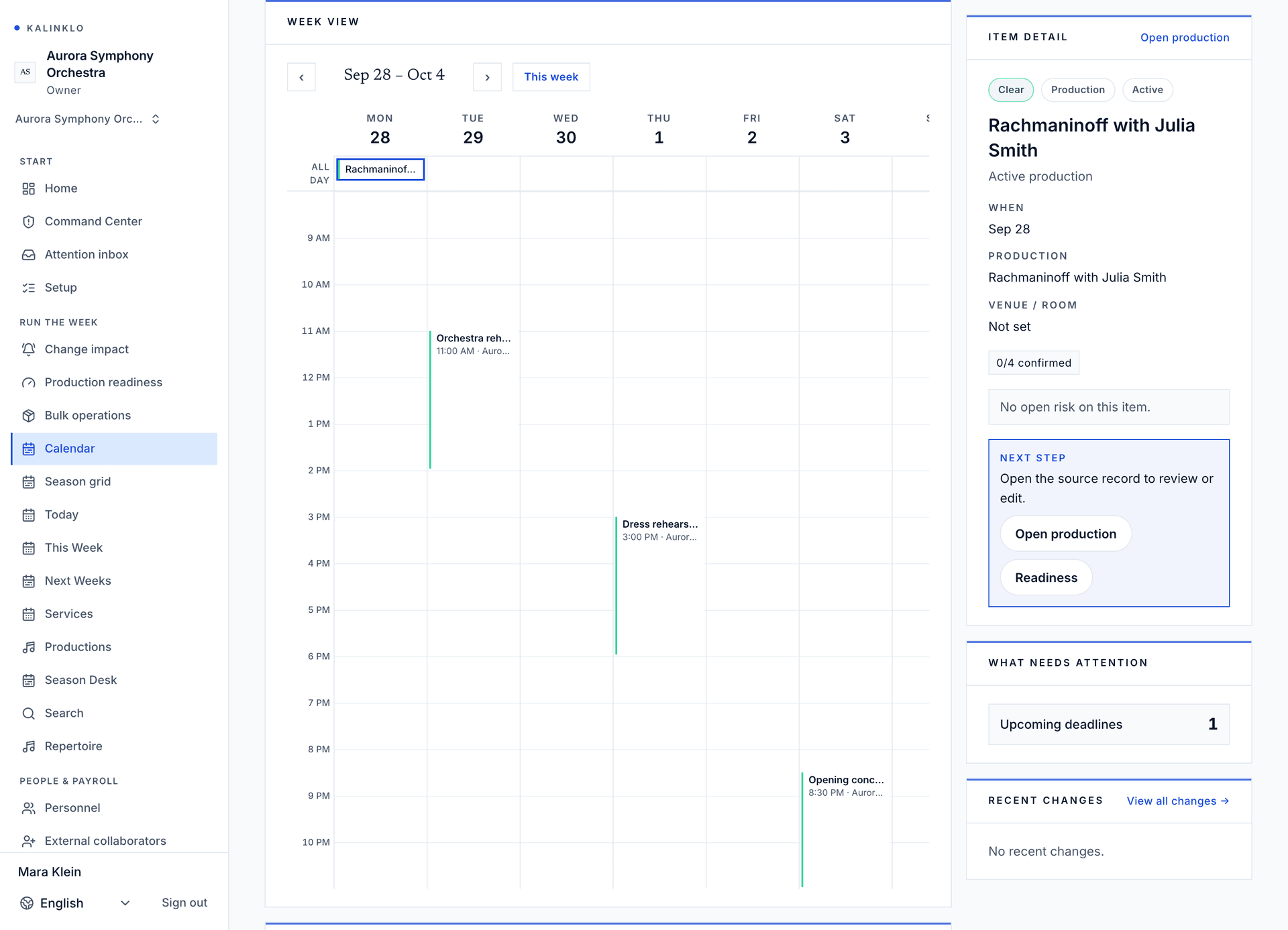
Open full-size workspace image
How it fits together
From the first hold to the final rehearsal.
Plan productions and manage engagements in separate workspaces. When a booking is confirmed, authorized staff can review the details and pass them to the production team.
Run the Week
See who is needed, what is scheduled, and which materials are ready. Keep calls, assignments, and updates together so your team can prepare for the next service.
- Production Desk
- My Week
- Personnel Desk
- Library Desk
- Command Center
Manage the Engagement
Follow each engagement from the first request through contracts, invoices, and settlement. Keep the artist, agency, and presenter work organized in their own workspaces.
- Season Desk
- Engagement Ledger
- Agency OS
- Studio
- Contracts & Invoices
From booking to production
Share the operational details your team needs, while contracts and fees stay with the people authorized to see them.
The complete workspace
Every part of the work. One connected platform.
Explore the tools available to each role, from the first engagement to the final rehearsal.
Availability depends on your role, plan and workspace setup. Compare plans
Features shown: 76
Run the Week
See who is needed, what is scheduled, and which materials are ready. Keep calls, assignments, and updates together so your team can prepare for the next service.
Explore this workspaceProduction Desk
Productions, services, call times, personnel, materials, announcements, confirmations, and readiness.
Personnel
People, sections, roles, substitutes, assignments, and time-limited access.
Command Center
The operator view for readiness, open risks, and the next action across the current production week.
Repertoire
The organization's works catalogue — title, composer, duration, instrumentation, and publisher. Import a catalogue in bulk, then program works onto productions from the production detail page.
Seating and rotations
Production seating plans, chair and desk assignments, service overrides, substitute replacements, and rotation history. The roster remains the source for member profile fields.
Leave & sickness
Review member leave, sickness, and conflict requests. Approved and staff-entered unavailable windows feed personnel conflict warnings; denied or cancelled rows stay in the audit trail but do not block scheduling.
Payroll preparation
Prepare agreement-aware service counts, review advisories, approve periods, and create provider-ready exports. Kalinklo does not run payroll or payments.
Workload relief ledger
Convert exact repertoire minutes into configurable points, normalize by contract fraction, and publish an immutable weekly and season-to-date report.
Repertory occupancy
See hours, working days, contract-normalized intensity, simultaneous productions, and schedule conflicts for the selected period and the full season.
Rooms & equipment
Book rehearsal rooms, performance spaces, storage, equipment, and vehicles. Overlapping bookings on the same resource are caught before they double-book. Export usage from Reports.
Touring and travel
Plan itinerary stops, travel and hotel groups, instrument cases, and visa, carnet, and insurance metadata. This is an operating record, not a booking tool; it stores no sensitive personal travel data.
Address book
Your organization's directory of external contacts — venues, guest conductors, soloists, agencies, presenters, suppliers, and ensembles you work with. Your own musicians and staff live in Personnel. Export the full book as CSV from Reports.
Search
Find any production across past, present, and future by title, season, program, artistic leader, soloist, or programmed work. Filter by status to browse the archive.
Issues & punch list
Track operational problems, assign owners, and close the loop before they affect a service.
Official change register
The authoritative history of published schedule, roster, repertoire, seating, and materials changes. Members confirm each affected change; you see who has not.
Audit log
Review recorded workspace changes, including who made them and when. Access is limited to your organization and permissions.
Reports & exports
Download your operational data as CSV — open it in Excel, Google Sheets, or your finance system. Every export is logged in your audit trail.
Library Desk
Rights-aware access to organization-approved materials. Files are never shared through public links — access follows role, assignment, rights status, and expiry.
Bowings
One set of bowings per string section per edition. Mark it once, keep the parts, and reuse it the next time the work is programmed.
Physical inventory
Track owned and rented scores, parts, folders, shelf locations, barcodes, condition, checkout status, missing parts, and rental expiry. This complements document access; it does not change member document permissions.
Circulation ledger
Track which physical scores, parts, folders, and rentals are currently out, who or what they are assigned to, what is overdue, and what changed most recently.
Instruments
Track instrument loans, returns, inspections, repairs, and maintenance.
My Week
Each musician sees their own calls, materials, parts, announcements, and confirmations.
Explore this workspaceWeek
Each musician sees their own calls, materials, parts, announcements, and confirmations.
Your productions
The projects you’re assigned to — open one for the full summary.
Notifications
Replies to your requests, availability decisions, roster changes, and everything else that needs your attention.
Changes to your schedule
When a call time moves, a venue changes, a service is cancelled, or a member is replaced, it appears here. Confirm you saw it so staff know the message arrived.
Announcements
Updates sent to you by staff. Acknowledge the ones that require a response.
Ask staff for something
Submit leave, time off, an address change, or a conductor evaluation. Only you and personnel staff can see your requests.
Section messages
Private one-to-one messages with players in your section — for covers, carpools, and coordination. Everything stays in the app.
Book a practice room
Reserve a room the office has opened for member booking. Times use the workspace’s local time, and occupied slots are blocked automatically.
On the road
Your itinerary, hotels, and travel group for current and upcoming tours. Times use the workspace’s local zone — check each stop for local details.
Pay & services
Your service count and pay to date. Staff finalize the numbers — contact the office with any question.
Your attendance record
How the office recorded your attendance, service by service. If something looks wrong, flag it for the personnel office to review.
Propose a substitute
Can't make a service? Propose who covers your chair — management confirms it, and the substitute receives the schedule and parts.
Studio
Professional identity, availability, repertoire, media, and engagement history.
Explore this workspaceYour profile
Manage biography, instruments, media, fee visibility, and representation settings.
Performance calendar
Track booked, held, and open dates as engagement status changes.
Repertoire
Concertos, recitals, chamber works, and program highlights presenters can browse before they reach out.
Media reel
Add performance clips and a showreel — video and recording links presenters can watch on your public profile, beyond a single platform link.
Performance archive
Curate the highlights of your career — past performances, roles, and recordings presenters can browse on your public profile, even before you have engagements booked through Kalinklo.
Representation
See who represents you on Kalinklo and end any active representation yourself. Agencies manage their commercial terms from their roster.
Ensemble members
Linked artists, combined availability, and shared engagement routing for ensemble bookings.
Availability requests
Organizations can ask whether you are available for a date. Your response controls only a private calendar block; commercial terms remain separate.
Requests
Accept, decline, or counter direct booking requests from presenters.
Your quotes
Build and negotiate quote versions across active requests and bookings.
Your contracts
Review and counter-sign contracts sent for your engagements.
Your invoices
Issue and track invoice lifecycles across confirmed engagements.
Earnings statement
What you have actually earned across every engagement — realized cash net of refunds, plus what is still outstanding. Grouped by currency.
Advancing checklist
Everything still open across your upcoming confirmed engagements — technical riders, invoices, contracts, and call details — ranked by how close performance day is.
Technical riders
Your stage, piano, lighting, and dressing-room requirements for each engagement — kept in sync with the presenter and your agency.
Hospitality riders
Your dressing-room, catering, dietary, and logistics requirements for each engagement — kept in sync with the presenter and your agency.
Agency OS
Private roster, routed requests, contracts, invoices, commissions, and relationships.
Explore this workspaceBranded client portal
Present your agency where configured while the platform stays behind it.
Team
Invite colleagues, assign workspace roles, and manage pending invitations.
Roster
Manage represented artists, territory coverage, and the agency relationships that route presenter requests to your team.
Roster calendar
Routed requests, protected holds, confirmed bookings, and roster timing in one operational view.
Engagements
Engagements organizations have routed to your agency—from request to settlement. Bring the roster, keep control.
Commissions
Commission on engagements organizations route to your agency—pending until the engagement settles, earned once settlement closes.
Contacts
Find organizations and presenters from your agency’s engagement and booking history.
Talent shortlists
Track prospective artists you may want to sign or pitch, separately from your active roster. Add an artist by their public profile handle.
Contract templates
Reusable contract language your team can start a draft from. Templates created here are available when drafting a contract.
Roster broadcasts
Send one message to your whole managed-artist roster and track who acknowledged it—for availability checks, policy updates, and season calls.
Advancing readiness
A portfolio-wide readiness board across active engagements: signed contracts, issued invoices, program data, and technical-rider completeness. Open an engagement for its detailed advancing view.
Technical riders
Capture stage, piano, lighting, dressing-room, and rider-file details for represented bookings.
Hospitality riders
Capture dressing-room, catering, dietary, and travel or logistics details for represented bookings.
Season Desk
Presenters plan seasons, place holds, route approvals, and keep private records.
Explore this workspacePlan seasons. Hold artists. Confirm engagements.
Plan season slots, find artists, route holds, and track budgets through confirmation.
Team
Invite colleagues, assign workspace roles, and manage pending invitations.
Your season at a glance.
See every season slot, sent request, active hold, and confirmed booking in one place — then fill the gaps.
Find artists for your season
Search the reviewed artist network by instrument, repertoire fit, fee range, and date-aware availability. Request Hold is the next safe step before terms, contract, and invoice.
Request Hold
Send a structured hold request. Kalinklo routes it to the artist or agency by territory; no booking is confirmed until they respond.
Bookings
Monitor confirmed events, advancing tasks, and completions.
Contracts
Review and sign incoming contracts with full timeline visibility.
Contacts
Your organization's CRM. Keep the artists, managers, agencies, and venues you work with — including notes, tags, and a complete interaction history. Only your team can see them.
Venues
The halls, churches, and stages where you present. Venues added here appear in the Season Planner, booking requests, and confirmed engagements.
Organization profile
Name, type, description, logo, and contact details shown in artist requests and connected agency portals.
Advancing checklist
A portfolio-wide readiness board across all active engagements: signed contracts, issued invoices, program data, and technical-rider completeness. Open an engagement for its detailed advancing record.
Technical riders
Manage production requirements for each booking and keep execution handoffs synchronized with artist and agency teams.
Hospitality riders
Manage catering, dressing-room, and hospitality logistics for each booking and keep handoffs synchronized with artist and agency teams.
Your organization trial lasts 60 days, followed by 7 days of read-only access.
Managed services
Support for migration, onboarding and the workflows your team needs. Scope is agreed before work begins.
Every ensembleRun the Week, in your ensemble’s language.
Kalinklo adapts its vocabulary while the operating model remains consistent.
| Ensemble | Who leads | Members classified by | The roster |
|---|---|---|---|
| Orchestra | Conductor | Instrument | Personnel |
| Opera company | Music Director | Voice type | Company |
| Conservatory | Director of Music | Principal study | Students |
| Chamber ensemble | Music Director | Instrument | Players |
| Festival | Artistic Director | Discipline | Roster |
Choirs, bands, and theatre pits can use the same tools with vocabulary and section presets suited to their ensemble.
How it lands
Migration and trust, answered.
How migration works
Review your records together, map the import, and check the result before your team begins. Timing depends on the scope and quality of your data.
See MigrationHow trust works
Reviewed access, least-privilege permissions, auditable records, and rights-aware materials.
See Trust Center